|
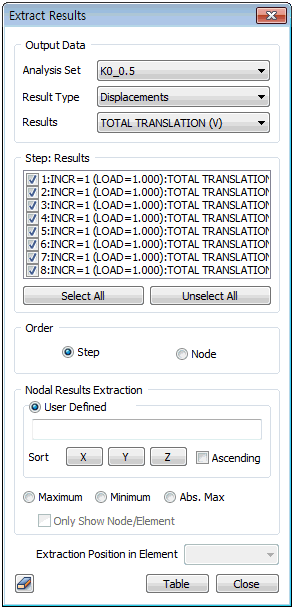
Select the analysis conditions and result type of the extraction target, and specify the results.
The result types differ, depending on the analysis model setting (2D/3D) and material property (Plain strain, Plate, Solid etc.).
Step: Results
Specify the result extraction target step from the results. To select all steps in the list, click the [Select All] button. To deselect all selected steps, click the [Unselect All] button.
The Order are [Step] or [Node].
For [Step], the extracted result values are listed on a table in the order of affiliated step. For [Node], the extracted result values are listed on a table in the order of node coordinates for nodes, and the center of mass coordinates for elements.
The nodes, from which the result values will be extracted, can be selected by directly entering the node ID number or selecting the nodes on the screen. It is possible to extract only the maximum, minimum and absolute minimum values. Checking [Only Show Node/Element] extracts the maximum/minimum value within a node/element displayed on the screen.
The element extraction location, where the result values will be extracted, can be directly specified for a 1D element.
|


 Extract the user desired data from the analysis result.